Search
Banner

Remediation Playbook

Your vulnerability. Your environment. Your remediation plan.

Turn a single vulnerability finding into a dated response plan for your system. Get technical steps your team can review, a plan they can hand over, and a way to request an Edgescan retest once the fix is in.

How to Generate a Remediation Playbook from a Vulnerability Finding in Edgescan

This demo shows how to turn an Edgescan vulnerability finding into a dated remediation playbook with containment steps, technical instructions, and a way to request a retest.

Generating a playbook

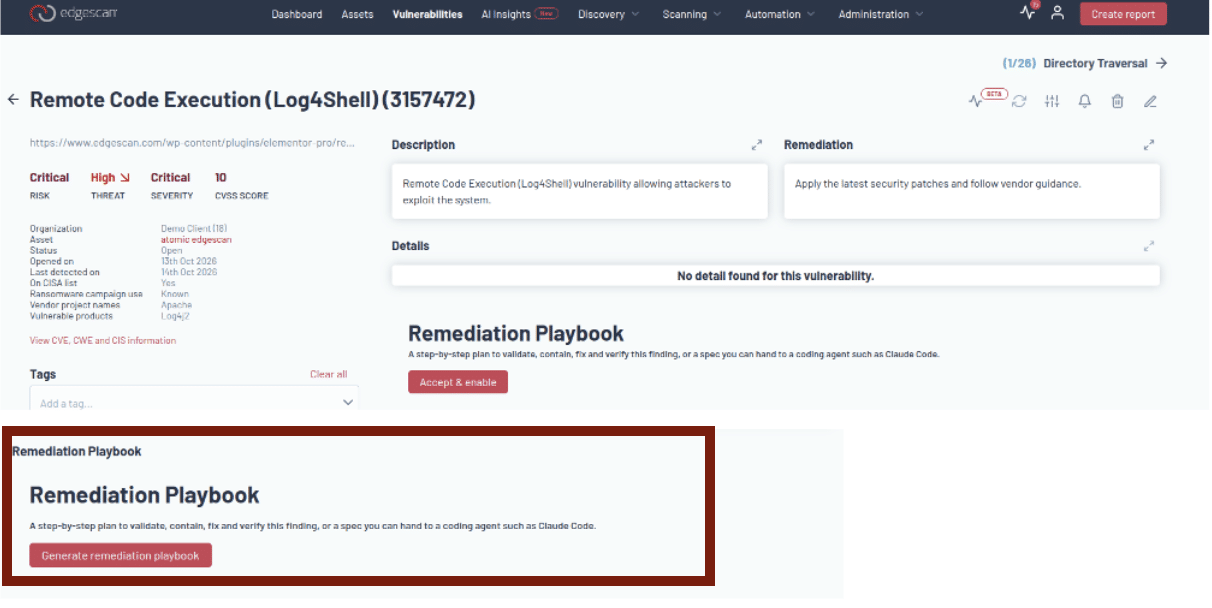
From the vulnerability page, select a vulnerability. The Remediation Playbook section is located directly below the Description and Remediation sections. Click Generate Remediation Playbook. Choose the output type: a playbook for your team, or a specification to pass to an AI coding agent. A default playbook type can be set for each asset. Click Generate to convert raw vulnerability data into clear, sequenced steps.

What the playbook contains

  1. Validate: steps to confirm the vulnerability is still present and assess its scope, exposure, ownership, and dependent systems.
  2. Contain: steps to reduce exposure while the fix is being prepared. For web-facing findings, this points to the WAF Virtual Patch rule generator in the Edgescan Platform.
  3. Check for compromise (where relevant): investigation steps included when the vulnerability is listed in CISA's Known Exploited Vulnerabilities Catalog, is linked to known ransomware use, or allows remote code execution.
  4. Fix: technical instructions and copy-paste commands for engineers to review before use.
  5. Verify: checks and commands to confirm the fix worked and that the vulnerability has not returned.

References and retesting

Each step is backed by trusted references, so teams and auditors can see the reasoning behind it. Every playbook includes an API call to request an Edgescan retest of that specific vulnerability, made with an Edgescan API token. The call appears in the on-screen playbook and in the copied or downloaded version.

Exporting and editing

Playbooks can be downloaded as a PDF or as Markdown. The three-dot menu provides options to edit or regenerate the playbook. In Edit Settings, the playbook can be regenerated in either output type: for your team, or as a specification for an AI coding agent.

Finding it isn’t fixing it

Your security team has found the vulnerability. Great. Now someone has to decide what needs to happen first. How to reduce exposure while the fix is being prepared, and how to check that the change has worked.


Because “just patch it” isn’t much of a plan

From finding to fix, with a plan for your system

Every Edgescan finding comes with remediation guidance. The Edgescan Remediation Playbook complements that guidance by using AI to turn the selected finding’s asset details and evidence into a dated response plan for that specific issue on your system.

Less time planning, more time fixing

Give engineers a head start

Start with technical instructions for the affected system so the team can spend less time working on how to apply the guidance.

Act while the fix is being prepared

Identify steps to reduce exposure before the permanent fix is in place

See what needs attention first

Work from dated actions and see when an overdue finding calls for immediate containment and remediation

Make the handover easier

Give the system owner a plan they can review and work from without asking security to write every technical step.

Download the Remediation Playbook datasheet.

What’s in a remediation playbook?

Each playbook covers four core phases, with a target date for each phase; a compromise assessment is added between containment and the fix when it applies.

1.

Validate

Steps to confirm the vulnerability is still present on the affected system
2.

Contain

Identify steps to reduce exposure while the fix is being prepared. For web-facing findings, the playbook points to the Edgescan WAF rule generator

Where relevant

Check for compromise

The playbook includes investigation steps when the vulnerability is listed in CISA’s Known Exploited Vulnerabilities Catalog, is linked to known ransomware use, or allows remote code execution.
3.

Fix

Technical instructions and copy-paste commands for engineers to review before use
4.

Verify

Checks and commands to help your team confirm that the fix worked

Every playbook includes an API call to request an Edgescan retest of that specific vulnerability. Use your Edgescan API token to make the request. The call is included in the on-screen playbook and the copied or downloaded version.

Request an Edgescan retest when you’re ready

A plan your whole team can work with

Security teams, engineers, and system owners don’t always need the same level of detail, but they do need to work from the same understanding of the issue. Remediation Playbook makes it easier to move from a finding to a structured set of next steps.

Security teams

Prepare a finding-specific recommendation without having to write every technical step themselves

Engineers and system owners

Work from clear tasks, environment-specific context, and technical instructions and verification steps

Engineering leaders

See what work is due and when, with target dates based on the finding’s SLA deadline or Edgescan’s default windows by risk.

For teams using AI coding agents

Generate a specification that can be passed on to an AI coding tool to support the implementation of the fix

How to Generate a Remediation Playbook from a Vulnerability Finding in Edgescan

This demo shows how to turn an Edgescan vulnerability finding into a dated remediation playbook with containment steps, technical instructions, and a way to request a retest.

Generating a playbook

From the vulnerability page, select a vulnerability. The Remediation Playbook section is located directly below the Description and Remediation sections. Click Generate Remediation Playbook. Choose the output type: a playbook for your team, or a specification to pass to an AI coding agent. A default playbook type can be set for each asset. Click Generate to convert raw vulnerability data into clear, sequenced steps.

What the playbook contains

  1. Validate: steps to confirm the vulnerability is still present and assess its scope, exposure, ownership, and dependent systems.
  2. Contain: steps to reduce exposure while the fix is being prepared. For web-facing findings, this points to the WAF Virtual Patch rule generator in the Edgescan Platform.
  3. Check for compromise (where relevant): investigation steps included when the vulnerability is listed in CISA's Known Exploited Vulnerabilities Catalog, is linked to known ransomware use, or allows remote code execution.
  4. Fix: technical instructions and copy-paste commands for engineers to review before use.
  5. Verify: checks and commands to confirm the fix worked and that the vulnerability has not returned.

References and retesting

Each step is backed by trusted references, so teams and auditors can see the reasoning behind it. Every playbook includes an API call to request an Edgescan retest of that specific vulnerability, made with an Edgescan API token. The call appears in the on-screen playbook and in the copied or downloaded version.

Exporting and editing

Playbooks can be downloaded as a PDF or as Markdown. The three-dot menu provides options to edit or regenerate the playbook. In Edit Settings, the playbook can be regenerated in either output type: for your team, or as a specification for an AI coding agent.

Download the Remediation Playbook datasheet.

FAQ

The Edgescan Remediation Playbook is a capability designed to turn an individual vulnerability finding into a detailed step-by-step response plan. It uses the findings, host, port, and evidence along with the customer’s remediation SLA to generate tasks and target dates.
Open the vulnerability detail page and go to the Remediation Playbook directly below Description and Remediation. Select Generate remediation playbook and choose your output format. Your organization must accept the AI insights data-sharing agreement before generating a playbook.

The playbook follows NIST SP 800-40r4, NIST SP 800-61r3, and the CISA Vulnerability Response Playbook. The AI is instructed to state its assumptions and avoid inventing version numbers, advisory IDs, or file paths. The AI is instructed to link only to NVD, MITRE CWE, the CISA KEV catalog, the OWASP Cheat Sheet Series and the vendor’s security page.

The playbook uses the finding’s SLA violation dates as fix deadlines when available. Otherwise, it uses Edgescan’s default windows by risk. 15 days for critical, 30 for high, 90 for medium, and 180 for low. It shows which basis is used and flags overdue findings for immediate action.
The solution analyzes a vast data lake of over 15,000,000 verified vulnerabilities to generate actionable insights, and can adapt to your organization’s needs to provide intelligence that’s specific to one unit of your business or applicable across multiple.

These insights will continuously update as your business grows and your security posture evolves, and reports are directly linked to live vulnerabilities within your systems so you can take prompt action with full context.

Edgescan already provides remediation guidance with every finding. Remediation Playbook complements this by generating a dated response plan for that specific finding on your system.
Each plan follows four phases: Validate, contain, fix, and verify. The compromise assessment, when included, sits between contain and fix. The playbook includes technical instructions, copy-and-paste commands, SLA aligned target dates, and verification steps.

No. Your team reviews the output, approves, and applies changes, and tests the result.

Yes. Copy or download the playbook or specification as Markdown for a ticket, change request or engineering handover. The retest API call is included.
It uses details from the selected finding, including the asset name, location, ports, protocols, and supporting evidence. Edgescan masks passwords, tokens and other secrets it detects in the evidence before sending it to the AI

Each playbook covers one vulnerability finding at a time.

Ready for security that is fast, accurate and quiet?
Experience the hybrid advantage of AI Scale + Human Validation.